Windows Messaging
~ the last words ~
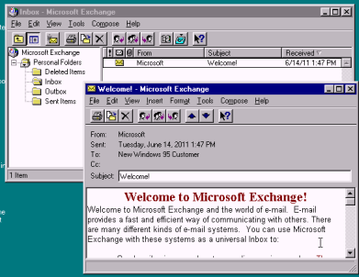
Windows 95 shipped on 24 August 1995 with an icon labeled Inbox sitting on the desktop next to My Computer. Double-clicking it started a wizard that asked which messaging services you wanted to set up, and for most people who tried it the honest answer was none of them. The program behind the icon was Microsoft Exchange Client, the only mail software Microsoft put in the box, and it was built for somebody whose employer ran a mail server and handed out profiles.
The rename came in 1996. Microsoft Exchange Server was about to ship, and having a client and a server whose names began with the same two words was a support problem waiting to happen, so the client became Windows Messaging. It went out with Windows 95 OSR2 and with Windows NT 4.0 on the business side, keeping messages and folders in one file with a .pst extension.
The fax half is the part worth remembering. Microsoft Fax, carried over from the Microsoft at Work effort, dropped sent and received faxes into the same .pst as your email, so a fax from a supplier and a note from a colleague sat in the same list with the same icons around them. It would also answer the modem and act as a fax server for other machines on a small network, a capability Windows then went without until Vista.
Windows 98 shipped on 25 June 1998 with Outlook Express 4.0 installed and configured out of the box, and Windows Messaging reduced to an optional component you could add from the setup CD if you knew to look for it. Almost nobody looked. Windows 2000 arrived in February 2000 without it and would not run it, and neither would Windows Me or Windows XP.
~ the record ~
| Born | 24 August 1995, as the Inbox icon on the Windows 95 desktop |
|---|---|
| Peak | 1996 and 1997, the only mail client bundled with Windows |
| Killed | 25 June 1998, when Windows 98 installed Outlook Express 4.0 in its place |
| Lifespan | just under three years as the default mail client in Windows |
| Made by | Microsoft |
| Killed by | Outlook Express, plus a rename that pointed at a server product |
~ the icon on every desktop ~
For about two years this was the most widely distributed email client in the world by install base and one of the least used by any other measure. It came with the operating system, so its count was whatever Windows 95's count was, and Windows 95 sold in numbers nobody had seen before. Actually using it required a mail account, and in 1995 that mostly meant working somewhere that ran Microsoft Mail or Exchange.
I came online in 1998 on a 33.6k modem in Turkey, which was the wrong year and the wrong country for this thing twice over. Mail here went through a browser almost from the start, Hotmail and then whatever address TTNet handed you, so a desktop client keeping a local .pst file answered a question nobody around me was asking. The Inbox icon was something you dragged off the desktop to make room.
~ where it went afterward ~
The lineage forks cleanly. On the consumer side, Internet Mail and News shipped alongside Internet Explorer 3 and grew into Outlook Express 4.0, which Windows then installed by default for the next ten years. On the professional side, Microsoft Outlook took the heavier job and inherited the .pst format, which is why a file written by Windows Messaging in 1996 will still open in Outlook now.
The naming is what confuses anybody reading this period back. Microsoft Exchange Client, Windows Messaging, Outlook Express and Microsoft Outlook are four product names spread across six years, and only two of them share a codebase.
~ the file that outlived it ~
Windows Messaging stopped being the mail client in 1998 and .pst did not stop being anything. It is still what Outlook uses for local storage, and still the reason an archive written three decades ago opens without a converter in between.
Microsoft Fax is the clearer loss. Putting faxes in the mail list was the right idea about what a message is, and pulling it out left a specific hole: the ability to answer the line and serve faxes to other machines did not come back to Windows until Vista. For a few years in the late nineties a stock Windows install could do something a stock Windows install could not do again until 2007.
~ leave a rose ~
an anonymous tribute. one rose per visitor per day.
@}-->-- ... roses left here
~ leave a wreath ~
a rose fades by morning. a wreath stays on this grave for good, with your name on it.
from $1, paid once through stripe. it keeps the graveyard running: the hosting and the nightly digging. adopt it and the headstone reads "maintained in memory by" you. the groundskeeper plants new wreaths at the next tending, usually within a day.
» one email a week: new graves and the anniversaries of the dead. subscribe
other software: Instacast, Cotation Assistée en Continu, Microsoft Office 2019, Microsoft Paint 3D
also died in the 1990s: Cotation Assistée en Continu, Simulmondo, Leading Edge
~ leave a note ~
visitors before you have left these graveside notes. anonymous welcome.