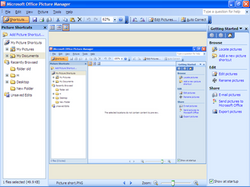
Microsoft Office Picture Manager
~ the goodbye ~
i used picture manager constantly without ever knowing i was using it. on every office install at university and later at work, double-clicking a jpeg in windows explorer opened picture manager. it had a small green icon and took maybe half a second to open. you could crop, rotate, or resize for email. that was the whole product. nobody picked it. it was just there.
microsoft shipped it on august 19 2003 with office 2003 as the replacement for microsoft photo editor, which had been the office 97 and xp image utility. picture manager added batch processing and a folder-tree panel for browsing images on disk, plus a red-eye fix that worked maybe sixty percent of the time. it lived inside the office tools subfolder of the start menu, which meant most people found it the way i did, by accident, the first time they tried to open a jpeg after installing office.
office 2013 launched on january 29 2013 without picture manager in the bundle. microsoft never wrote a press release about cutting it. there was a support page that said the product was retired and recommended windows photos as the alternative. windows photos at the time could not crop. millions of office users hit that wall over the next few years and figured out their own workflow: paint for cropping, or downloading paint.net, or living with the default photo viewer in windows 7 that the office installer had been overriding the whole time.
the office 2010 install of picture manager kept working for a long time. if you had an old office key on a new windows 10 machine, you could still install office 2010, and the picture manager binary would launch fine. microsoft eventually published a standalone installer pulled from sharepoint designer 2010 as the unofficial way to get it back. there is a small population of people still running it in 2026 on windows 11 machines because it opens faster than anything else and does exactly what they need.
~ the chronicle ~
| Born | August 19 2003, with Office 2003 |
|---|---|
| Peak | Office 2007 and 2010 era, default jpeg handler on most corporate windows installs |
| Killed | Office 2013, January 29 2013 |
| Lifespan | ~10 years bundled |
| Made by | Microsoft, Office team |
| Killed by | Office 2013 declined to include it; windows photos absorbed the role |
~ what it actually did ~
the feature set was small on purpose. you opened a folder and saw thumbnails. clicking an image showed it bigger. crop was a draggable rectangle. resize for email baked the output to a smaller jpeg with a sensible quality setting. there were brightness and contrast sliders, and a red-eye click tool that wanted you to click on each eye individually. that covered the entire app. the batch export was the only thing that felt like a power feature, and it let you take a folder of digital camera jpegs at 4 megapixels and dump them out at email-sized 800 pixels wide in one pass. that was the killer use case in 2005 when broadband upload speeds were still slow enough that you had to think about jpeg sizes before attaching them to outlook.
~ why nobody replaced it ~
windows photos in windows 10 and 11 added view-and-flip and not much else. the cropping ui that finally arrived in the photos app in 2017 was nicer to look at but slower to use, and it could not do batch resize. paint 3d shipped and was abandoned. the windows file explorer never grew a crop. picture manager survived in the corporate-machine population as the default tool for a job nobody had bothered to redesign. you could find the install instructions on the second page of any "how do i crop a photo for our team report" thread on a corporate help forum. it always involved downloading the sharepoint designer 2010 installer and unchecking everything except the picture tools.
~ the long tail ~
in 2026 the recommended way to crop a jpeg on windows 11 without installing anything is still to paste the image into paint and crop it there. that is the same workflow office 97 users had in 1997, sixteen years before picture manager existed and thirteen years after it died. the brief window where microsoft shipped a default image cropper as part of the office suite is over. the next generation of office users will not remember that there was ever a green-iconed app that opened when you double-clicked a jpeg.
~ leave a rose ~
an anonymous tribute. one rose per visitor per day.
@}-->-- ... roses left here
~ leave a wreath ~
a rose fades by morning. a wreath stays on this grave for good, with your name on it.
from $1, paid once through stripe. it keeps the graveyard running: the hosting and the nightly digging. adopt it and the headstone reads "maintained in memory by" you. the groundskeeper plants new wreaths at the next tending, usually within a day.
» one email a week: new graves and the anniversaries of the dead. subscribe
succeeded by: Microsoft Photo Editor
other software: Adobe Encore, Weaveworks, Sync for Reddit, Dabble DB
~ leave a note ~
visitors before you have left these graveside notes. anonymous welcome.